

Use Cases and Best Practices
This topic presents common use-cases, examples, and best practices.
Display an Artist Catalog (Discography)
This section describes how to join and cross-reference files to display complete artist discography.
Album Master and Editions
Example
X by Ed Sheeran
| Object Name | Description | Example |
|---|---|---|
| Album Master ID | The unique identifier for the master album | GNEH7NS4W15VQN9 |
| Album Edition ID | The unique identifier for the album edition | GN7YJ63ENM30AST |
Use Case: Album Master
For retrieving metadata for a specific album, Master ID provides the grouping of editions and links users to the preferred edition recommended to pull metadata from.
Example
| Implementation | Base Package |
|---|---|
| Object Name | albumMasterID, preferredEditionID |
- Join preferredEditionID from the Album Master file with albumEditionID in the Album Edition file to retrieve Edition level metadata from Album Edition file for each albumMasterID.
Use Case: Album Edition
For catalog display, album editions provide the complete list of discography published by the artist (for example, differentiating between editions with different number of tracks based on region, deluxe and special editions etc.)
Example
| Implementation | Base Package |
|---|---|
| Object Name | albumMasterID, albumEditionID |
- Group editions based on the albumMasterID from the Album Edition file to list out all albumEditionIDs mapped to it.
Recordings
| Object Name | Description | Example |
|---|---|---|
| Recording ID | The unique identifier for the recording | GN0THW2YV0SWP23 |
Use Case: Display all appearances of a song or recording by that artist.
Example
Shape of You by Ed Sheeran
| Implementation | Base Package |
|---|---|
| Object Name | albumEditionID, recordingID, songID |
Each Song ID provides the different editions of the song. Each recording lists the different albums which that specific recording has been published. For the completeness, do not truncate the number of recordings and albums retrieved when compiling song and album lists.
- Join recordingID (under tracks array) in the Album Edition file with recordingID in the Recording file.
- To list out all recordings for each artist, for each artistID (under artist array) in the Recording file, list out all recordingIDs directly mapped to it.
- To list out all recordings based on songs for each artist, for each artistID (under artist array) in the Recording file, group by songID to list out all recordingIDs mapped to it.
- To retrieve all the album editions each recordingID appears in, look for the target recordingID (under tracks array) in the Album Edition and retrieve all the respective albumEditionIDs.
Artist Links (Key Artist/Member of Collaborations)
| Object Name | Description | Example |
|---|---|---|
| Key Artist | Primary artist leading a group or collaboration | Group "The Miles Davis Quartet" has Key Artist: Miles Davis. |
Use Case: Key Artist
Display all discography by an artist including their different backing band billings into one master discography on the main artist's page (defaults to separate).
Example
Prince as Key Artist of bands
| Implementation | Search Package |
|---|---|
| Object Name | artistID, keyArtists |
Prince is part of 5 different bands but is the "Key Artist" only in Prince & 3RDEYEGIRL, Prince & The Revolution and Prince & The New Power Revolution. "Key Artist" can be used to combine all albums for Prince and these 3 bands.
If the preference is to keep each artist and bands separate, the default is to use "Album Artist ID".
- Join artistID (under artist array) in the Album Master file with artistID in the Artist file.
- For each albumMasterID, retrieve both artistID and keyArtists from the Artist file.
- To retrieve all album masters the target artistID appears in, look for the target artistID in both artistID and keyArtists fields in the Artist file and retrieve all the respective albumMasterIDs in the Album Master file.
Use Case: Member of Collaboration
Include all collaboration tracks within an artists' Song and Recordings listings (defaults to separate).
Example
Luis Fonsi collaborations
| Implementation | Search Package |
|---|---|
| Object Name | artistID, albumMasterID |
- To display all the recordings that Luis Fonsi is in, retrieve all recordings under the Artist IDs of Luis Fonsi (GNBFZXJPH1GEW4V) and collaboration Artist IDs listed under "Member of Collaborations" in the "Related Artist" object.
- Join artistID (under artist array) in the Album Master file with artistID in the Artist file.
- For each albumMasterID, retrieve both artistID and memberOfCollaborations (under relatedArtists array) from the Artist file.
- To retrieve all album masters the target artistID appears in, look for the target artistID in both artistID and memberOfCollaborations (under relatedArtists array) fields in the Artist file and retrieve all the respective albumMasterIDs in the Album Master file.
Display Formatting (Sorting and Grouping)
How to sort and group artist discography for better user experience.
Original Artist Release (OAR) Type
| Object Name | Description | Example |
|---|---|---|
| Release Type ID | The unique identifier for the release type | 1,2,3,4, or 10. |
Use Case: OAR Type
Display an artist's discography with Singles, EPs, and Collections separated out into different sections.
Example
ABBA discography
| Implementation | Discovery Package |
|---|---|
| Object Name | releaseType |
Based on the OAR Types, you can group and separate different recording types. ABBA's discography, for example, can be grouped together by displaying all OAR types, or separated by Main Canon (OAR Type 1), Collections (OAR Type 2,3,4) and Singles and EPs (OAR Type 10).
Depending on whether you are grouping by Album Master or Edition, you can group/sort/filter by releaseType based on in the respective files.
Hierarchies
Example
All descriptors have different levels of granularities. Depending on the details needed for each group, they can be categorized based on the "level" in the "nodes" of each respective group.
| Implementation | Discovery Package |
|---|---|
| Object Name | hierarchyID, hierarchyName |
Each hierarchyID or hierarchyName categorizes each branch by descriptors and/or regions. For example, "ERAS-DEFAULT", "GENRES-US-DETAILED", or "GENRES-EUROPE-SIMPLIFIED".
- Within a hierarchyID, set the initial filter to look for nodeIDs (under nodes array) by level = 1 (for example, "Tender" above). Based on the granularity you would like to sort by (level 1 meaning the broadest grouping), you can increase the granularity by searching level = 2 nodeIDs linked to the level = 1 nodeIDs under parentNodeID (for example, "Soft/Refined", "Lightly Stirring/Stately", "Lyrical Romantic", "Lite Groovy/Dreamy/Precious" above).
- To avoid duplication of the nodeName, ensure you are displaying either the nodeName for English language or filter by language_ID (under nodes > localizedNames > language_context array) so only the desired language output is returned.
Descriptors (Genre, Origin, Era, Artist Type, and Language)
| Object Name | Description | Example |
|---|---|---|
| Descriptors | Weighted attributes describing an artist or recording | Genre: Disco Language: English Origin: Stockholm Era: 1970s Artist Type: Mixed Group |
Use Case: Genre
This use case describes how to find and group popular soundtracks and scores.
Example
Slumdog Millionaire
| Implementation | Discovery Package |
|---|---|
| Object Name | albumMasterName, nodeID, nodeName, mappedDescriptorIDs (under nodes array) |
- Join ID (under descriptors > genres array) in the Album Master file with mappedDescriptorIDs in the Hierarchy file.
- Find the genre name "Film Score" under nodeName in the Hierarchy file and retrieve its respective nodeID (28286) and mappedDescriptorIDs (3271).
- Filter out all Album Masters with ID (under descriptors > genres array) = 3271 in the Album Master file and/or search for movie or series title substring ("Star Wars" or "Harry Potter") with albumMasterName if wanting to highlight a particular franchise.
Use Case: Genre
This use case describes how to find and display Broadway and other famous musicals.
Example
Musical Film "Spotlight" by Jennifer Hudson
| Implementation | Discovery Package |
|---|---|
| Object Name | artistName (under artist array), nodeID, nodeName, mappedDescriptorIDs (under nodes array) |
- Join ID(under descriptors > genres array) in the Album Master file with mappedDescriptorIDs in the Hierarchy file.
- Find the genre name "Stage Musicals", or "Musical Film/TV Music" under nodeName in the Hierarchy file and retrieve its respective nodeID and mappedDescriptorIDs .
- Filter out all Album Masters that have ID (under descriptors > genres array) in the Album Master file = mappedDescriptorIDs in the Hierarchy file and/or search for "Original Broadway Cast" or "Original London Cast" within artistName (under artist array) in the Artist file if wanting to showcase a particular city's theater scene.
Use Case: Origin
This use case describes how to enable browsing of artists from a certain geographic region, by rolling up specific locations to their country/region.
Example
JSON file currently provides the lowest level (most granular) origin ID. However, based on the hierarchy level you would like to work with, you can browse artist location at different levels depending on which level you would like to roll up to (level 1 at continental level, level 2 at country level etc).
| Implementation | Discovery Package |
|---|---|
| Object Name | artistID, mappedDescriptorID, level, nodeName, parentNodeID (under nodes array) |
- Join ID(under descriptors > origins array) in the Artist file with mappedDescriptorIDs (under nodes array) in the Hierarchy file.
- Depending on the level at which you would like to work with, retrieve the level and nodeName search for higher level descriptors by looking up the parentNodeID in the Hierarchy file.
Descriptors with Weights
Use Case: Era
Regardless of weight, it is better to display artist era decades in chronological order when displaying to end customer.
Example
浜崎あゆみ Era descriptors
| Implementation | Advanced Discovery Package |
|---|---|
| Object Name | artistID, mappedDescriptorID, level, nodeName, parentNodeID, nodeID (under nodes array) |
- Join ID (under descriptors > eras array) in the Artist file with mappedDescriptorIDs (under nodes array) in the Hierarchy file.
- Depending on the level at which you would like to work with, retrieve the level and nodeName search for higher level descriptors by looking up the parentNodeID in the Hierarchy file.
- However, for display purposes, list by ID (under descriptors > eras array) in the Artist file, in order to sort in chronological order.
Use Case: Tempo
Due to rounding, some recordings may show in JSON files with 0-tempo value (i.e. the weight on this tempo is less than 0.5). For display, it is best practice to ignore/remove the 0-values from the tempo list.
Example
Volver Volver by Vicente Fernández
| Implementation | Discovery Package |
|---|---|
| Object Name | weight (under descriptors > tempos array) |
- For the recording that is being displayed, filter and remove tempos which have a weight = 0 from results.
Popularity Scores
| Object Name | Description | Example |
|---|---|---|
| Popularity | Popularity scores by region and type | US All Time Popularity Trending Popularity |
Use Case: Popular Artists
Use popularity scores to display the most popular Artists in a week/month based on current scores.
Example
Instead of displaying artist catalog in alphabetical order, use popularity scores to sort display by most popular artists in a week/month for user recommendations.
| Implementation | Engagement Package |
|---|---|
| Object Name | region, score, type (under popularity array) |
- Based on the user location, filter display results by region and the type of score you are looking for between trending and historical.
- Sort Artists in order of score (under popularity array).
Use Case: Popular Recordings of an Artist
Use popularity scores to display the most popular recordings of an artist.
Example
Recording display for Adele
| Implementation | Engagement Package |
|---|---|
| Object Name | region, score, type (under popularity array) |
- Based on the user location, filter display results by region and the type of score you are looking for between trending and historical.
- Filter based on the target Artist and sort recordings in order of score (under popularity array).
Display using Languages and Locations
This section describes how to manage display artist discography based on user location or language preferences.
Artist Language Context
Example
A.R. Rahman
| Object Name | Description | Example |
|---|---|---|
| Languages | Languages associated with the artist | Tamil, Hindi, English and Bengali |
| Language Weights | Percentage relevance of each language | Tamil = 39%, Hindi = 35%, English = 22%, Bengali = 4% |
Use Case: Language and Script IDs
Filter an artist's output to only packaging in a certain language or script in your audience's local script and/or language when available.
Example
Beyoncé's metadata presented in Korean script
| Implementation | Search and Discovery Package |
|---|---|
| Object Name | artistID, ID (under descriptors > genres, languages, origins, eras, artistTypes array), name (under nodes > localizedNames array) |
Depending on the location or the language selection of the user, display the correct language script.
- For each artistID in the Artist file, non-English translations are found in artistName (under alternateNames array). To search by the specific target language, you can search by its languageID (for example, Arabic = 74496, Japanese = 74516).
- For each descriptor, Join ID (under descriptors > genres, languages, origins, eras, artistTypes array) in the Artist file with mappedDescriptorIDs (under nodes array) in the Hierarchy file.
- Locate the nodeID with the mappedDescriptorIDs (under nodes array) and search/filter by the target language_ID (under nodes > localizedNames > languageContext array) and display name (under nodes > localizedNames array).
The same approach can be used for:
- Artists IDs in Album Master, Edition, Recording and Song file
- Album metadata in the Album Master data
- Descriptor IDs in Master and Recording file
| Region | Artist Metadata |
|---|---|
| US | Every artist in the North American dataset should default to 'Latin' script (script_id = 74989). |
| Europe | Every artist in the Europe dataset should default to 'Latin' script (script_id = 74989). |
Album (Master and Edition) Language Context
| Object Name | Description | Example |
|---|---|---|
| Album Language | Language context for album titles | "Radio-Activity" Language: English Script: Latin "Radio-Aktivität" Language: German Script: Latin |
Use Case: Filter/Sort based on User Preferred Language
Filter or sort a multilingual artist's releases by the user's preferred language.
Example
Radio-Activity by Kraftwerk
| Implementation | Discovery Package |
|---|---|
| Object Name | albumMasterName |
- Based on the user's location or language selection, sort/filter artist discography based on the album language so the more relevant results are presented to users.
- With the target languageID (for example, Arabic = 74496, Japanese = 74516), search for albums with matching languageID (under languageContexts array) in the Album Master file to filter or display these relevant albums first.
Use Case: Filter Albums by Region
Based on the different regions that clients have subscribed to, filter albums by the relevant artist languages and scripts to filter out albums that are not published for the specific region.
Example
ayu-mi-x II by 浜崎あゆみ
| Implementation | Search and Discovery Package |
|---|---|
| Object Name | albumMasterID, name (under nodes > localizedNames array) |
| File Name | Hierarchy |
Album "ayu-mi-x II" released a Japanese version and a US + European version in 2000. For Korean regional users, if there is a Chinese and Korean version, Gracenote recommends filtering out albums with Chinese and Korean scripts to not distract Korean users with excessive album data not relevant to them.
- For each albumMasterID in the Album Master file, the album language can be found in languageID, scriptID (under languageContexts array). To filter results by the specific target language for each region, you can filter by its languageID (for example, Arabic = 74496, Japanese = 74516).
- For each descriptor, Join ID (under descriptors > genres, languages, origins, eras, artistTypes array) in the Album Master file with mappedDescriptorIDs (under nodes array) in the Hierarchy file.
- Locate the nodeID with the mappedDescriptorIDs (under nodes array) and search/filter by the target language_ID (under nodes > localizedNames > languageContext array) and display name (under nodes > localizedNames array).
See table below at the bottom for suggested language script filtering based on region.
| Region | Album Metadata | Descriptors |
|---|---|---|
| Latin America | Show all albums in Spanish and Portuguese languages using the regional scripts. language_id = 74529, 74528 script_id = 74989 | Show all descriptors in Spanish language using the regional hierarchies language_id = 74529 hierarchyID = 154, hierarchyName = GENRES-LATIN-AMERICA-SIMPLIFIED hierarchyID = 159, hierarchyName = GENRES-LATIN-AMERICA-DETAILED |
| Japan | Show all albums in Japanese language using the regional scripts. language_id = 74516 script_id = 74985 | Show all descriptors in Japanes language using the regional hierarchies. language_id = 74516 hierarchyID = 85, hierarchyName = GENRES-JAPAN-DETAILED hierarchyID = 86, hierarchyName = GENRES-JAPAN-SIMPLIFIED |
Rich Media: Artist and Album Images
This section describes how to link artist and album images
Artist Images
| Object Name | Description | Example |
|---|---|---|
| Artist Image | Image metadata for artists | "size": "XLARGE", "width": "1080", "height": "720", "value": "http://www.example.com/cds/2.0/image/DD79/1752/D161/A8A9_xlarge.jpg" |
Use Case: Member of Collaborations Images
If collaboration image is not available, use image of the primary artist in the collaboration.
Example
Justin Bieber collaborations
For "Chris Brown Feat. Justin Bieber" (Arist ID = GN7H1E648SAGFMP), Chris Brown is the primary artist, hence Chris Brown's artist imagery should be used.
For "Justin Bieber & Mariah Carey" (Arist ID = GN9KP26A4V4ZW4Z), Justin Bieber is the primary artist, hence Justin Bieber's artist imagery should be used.
| Implementation | Search Package |
|---|---|
| Object Name | artistID, recordingID, ID (under releaseType array) |
- Join artistID (under artist array) in the Album Edition file with artistID in the Artist file.
- Search for the target collaboration artistID (under tracks > artist array) and filter by ID (under releaseType array) not equal to 2 and 4 (multi-artist main canons and collections) in the Album Edition file. This will provide the list of album editions where the collaboration recording is published in the key artists' album.
- Retrieve the artistID (under artist array) of the album edition, and use the artist image from the URL value (under images > artistImages array) of the respective artistID in the Artist file.
Use Case: Musical and Soundtracks
For recordings from films or musicals, there will not be any specific artist imagery available for display. In those cases, look up the cover art of the soundtracks.
Example
Jai Ho recording from Slumdog Millionaire
| Implementation | Discovery Package |
|---|---|
| Object Name | recordingID (under tracks array), recordingID, nodeID, nodeName, mappedDescriptorIDs (under nodes array) |
- Join recordingID from the Album Edition file with recordingID in the Recording file to retrieve recording level descriptors ID (under descriptors > genres array).
- Join ID (under descriptors > genres array) in the Recording file with mappedDescriptorIDs in the Hierarchy file. To retrieve the genre names for each recording. For the example above, recordingID = GN2715H5FNQ39TE, ID (under descriptors > genres array) = 3271 in Recording file. Which is found to be under mappedDescriptorIDs in nodeID = 36182, nodeName = General Film Music.
- For recordingIDs where Genre links to soundtracks or films such as "General Film Score", populate artist imagery directly with the album cover art, found under the URL value (under images > albumImages array) in the Album Edition file.
Use Case: Key Artists/Primary Artists
For groups without images, fall back to use key party image.
Example
Prince & The Revolution
If there was no image available for "Prince & The Revolution", retrieve the key artist ( object "KeyArtists") and use artist image for Prince.
| Implementation | Search and Engagement Package |
|---|---|
| Object Name | artistID, artistID (under relatedArtists > keyArtists array) |
If band artistID (for example, Prince & The Revolution, aristID = GNDKZ3NT8NXQ740) returns "artistImages": null, search for artistID (under relatedArtists > keyArtists array).
With the artistID (under relatedArtists > keyArtists array), you can leverage the artist imagery of the key artist using the URL value (under images > artistImages array).
Cover Art
| Object Name | Description | Example |
|---|---|---|
| Cover Art | Album cover art metadata | "size": "XLARGE", "width": "1078", "height": "1080", "value": "http://www.example.com/cds/2.0/cover/CFE4/8375/25BE/79DA_xlarge.jpg" |
Use Case: Main Canon Image
If cover art is not available for the specific edition, propagate to use album master.
Example
Funhouse by P!nk
If "Funhouse: The Tour Edition" (Edition ID: GN85RB0D523VSTP) did not have a cover art available, the cover art of the Master Album (Master ID: GN05Q0ZZKHAZQ2Z) should be used.
| Implementation | Engagement Package |
|---|---|
| Object Name | albumMasterID, preferredEditionID, albumImages (under images array) |
- Join albumMasterID from the Album Edition file with albumMasterID in the Album Master file to retrieve preferredEditionID for each albumEditionID.
- For the target album edition, if albumEditionID does not equal albumEditionID and "albumImages": null (under images array) in the Album Edition file, use the URL value (under images > albumImages array) under the preferredEditionID.
Use Case: Single Album Image
If cover art is not available for master edition, look for other editions of the same single album.
Example
Depend on You by 浜崎あゆみ
| Implementation | Base Package |
|---|---|
| Object Name | albumMasterID, preferredEditionID, albumImages (under images array) |
- For the preferred editions do not have cover art available (Edition ID: GN4CV15FAQDGAT9), propagate to look for cover arts under different editions (Edition ID: GN7RCGJ3FCK9ZPE).
- Join albumMasterID from the Album Edition file with albumMasterID in the Album Master file to retrieve preferredEditionID for each albumEditionID.
- For the target album edition,iIf "albumImages": null (under images array) and albumEditionID equals preferredEditionID in the Album Edition file, search for other album editions which have the same albumMasterID and use the URL value (under images > albumImages array) under the other album editions.
Searching
This section describes how to provide an effective search user interface.
Artist Name Language Context (Alternate Names/Name Variants/Disambiguation)
| Object Name | Description | Example |
|---|---|---|
| Alternate Names | Alternative names for artists in different languages | Alternate name for The Weekend is: 위켄드 |
| Name Variants | Different variations of artist names | Names Variants for The Weekend are: Abel Makkonen Tesfaye |
Use Case: Artist Name
How to enable searches to find artists with very short names or generic word names.
Example
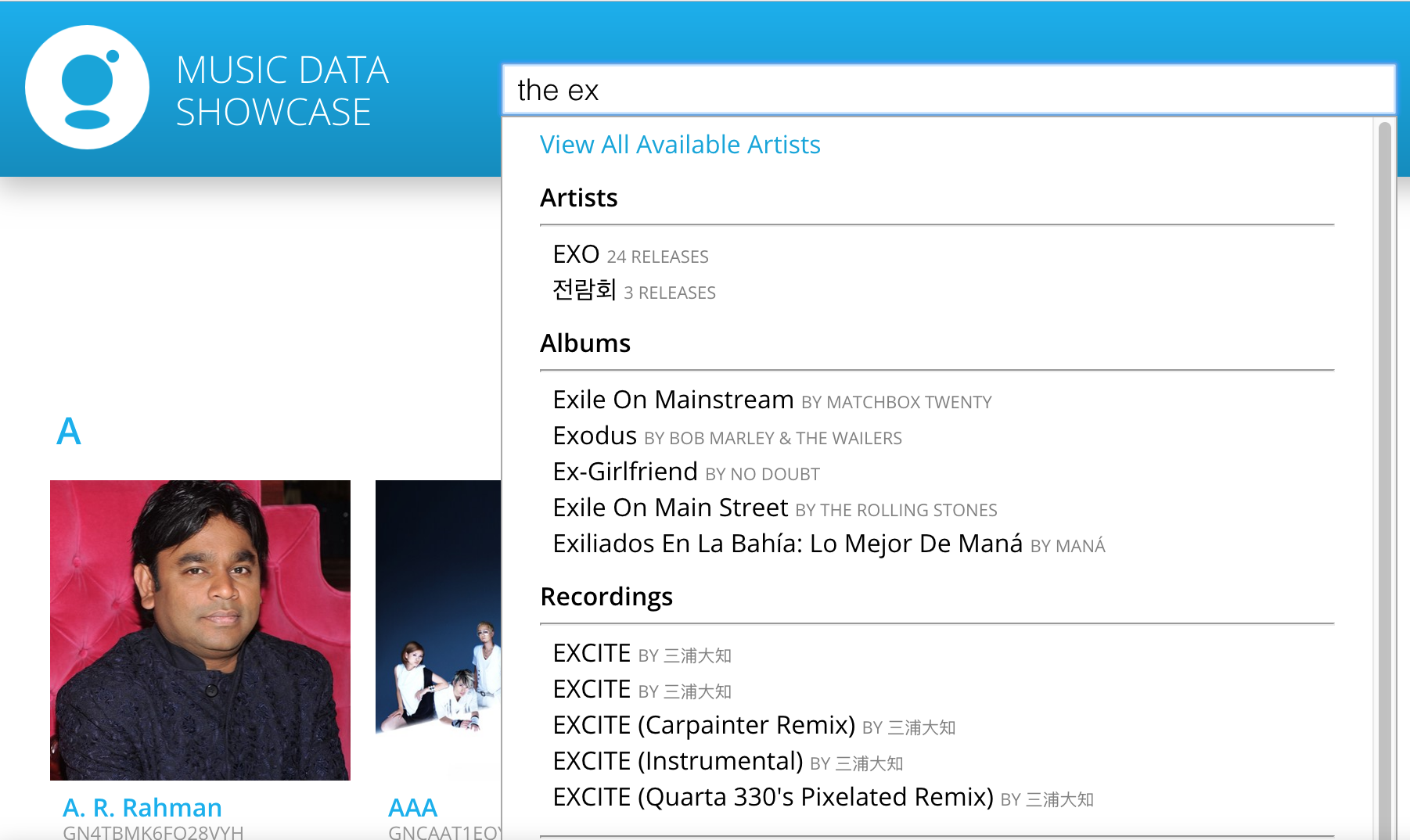
MØ, X, The Ex, The The, The Band
| Implementation | Base Package |
|---|---|
| Object Name | artistID |
Band names with short names or words are often excluded (in the case for "the" above) or incorrectly identified as being part of a word ("ex" here is being associated with "EXO", "Exile", "Excite" etc.). If users are expected to be searching for such bands, then they will need to be able to search with exact match with the Artist Name or its variants.
Enable exact match searching when the user adds notations such as "" to identify a complete search phrase and only return artistIDs with exact match.
The same can be done for Album Master, Album Edition, Recording and Song Names.
Use Case: Alternate Names and Name Variants
How to enable your search engine to find artists with special characters in their names and/or using another language
Example
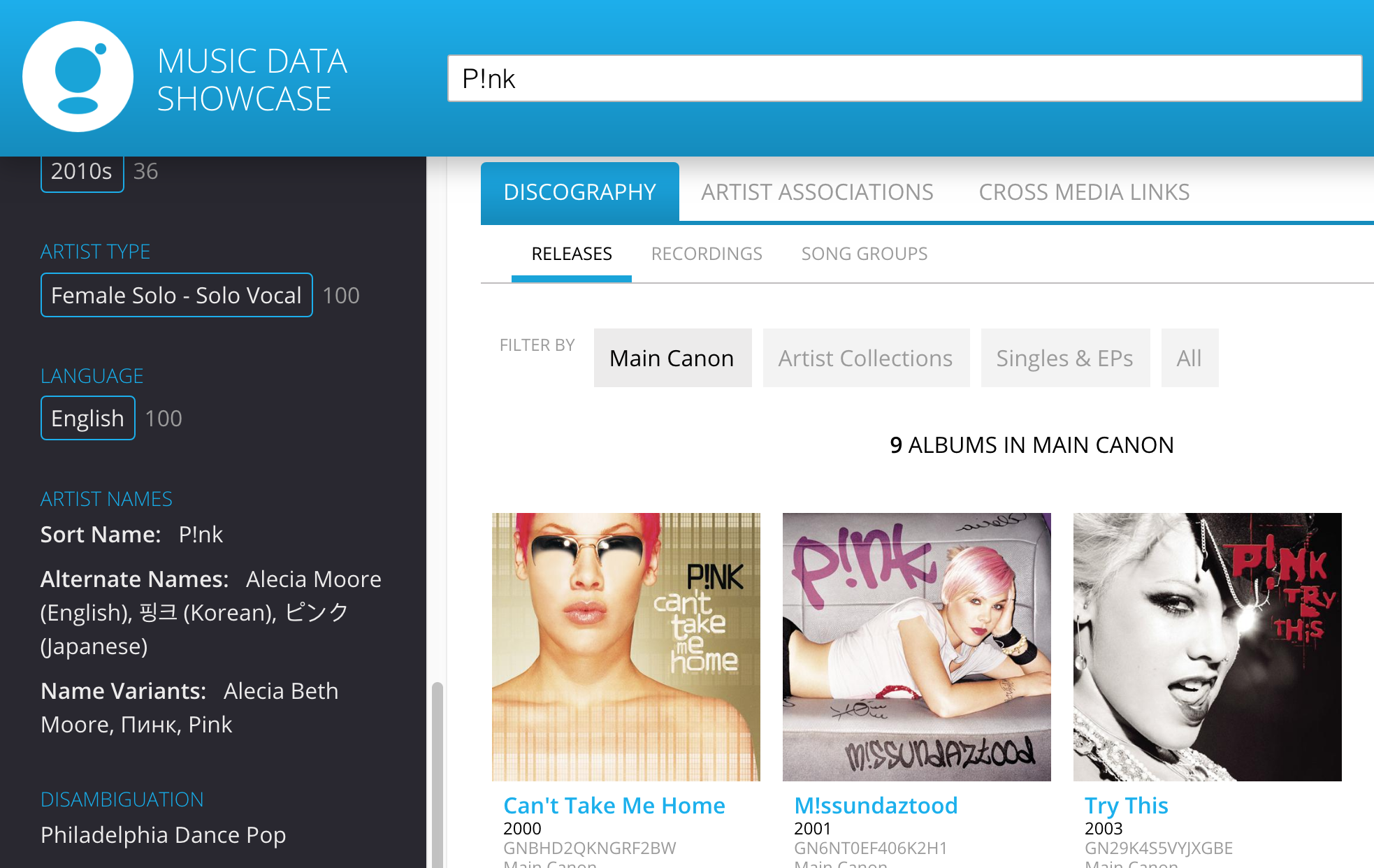
P!nk can be searched/known as "Pink", Alicia Beth Moore or 핑크 (Korean), ピンク (Japanese)
| Implementation | Search Package |
|---|---|
| Object Name | nameVariants |
- For search functionality, include Alternate Names and Name Variants so users can search based on the artist name they are most familiar with.
- Search across all nameVariants, artistName (under artistName array) and artistName (under alternateNames array) in the Artist file for the target artist.
Use Case: Alternate Names and Name Variants
How to use and how not to display duplicate entries of alternate names.
Example
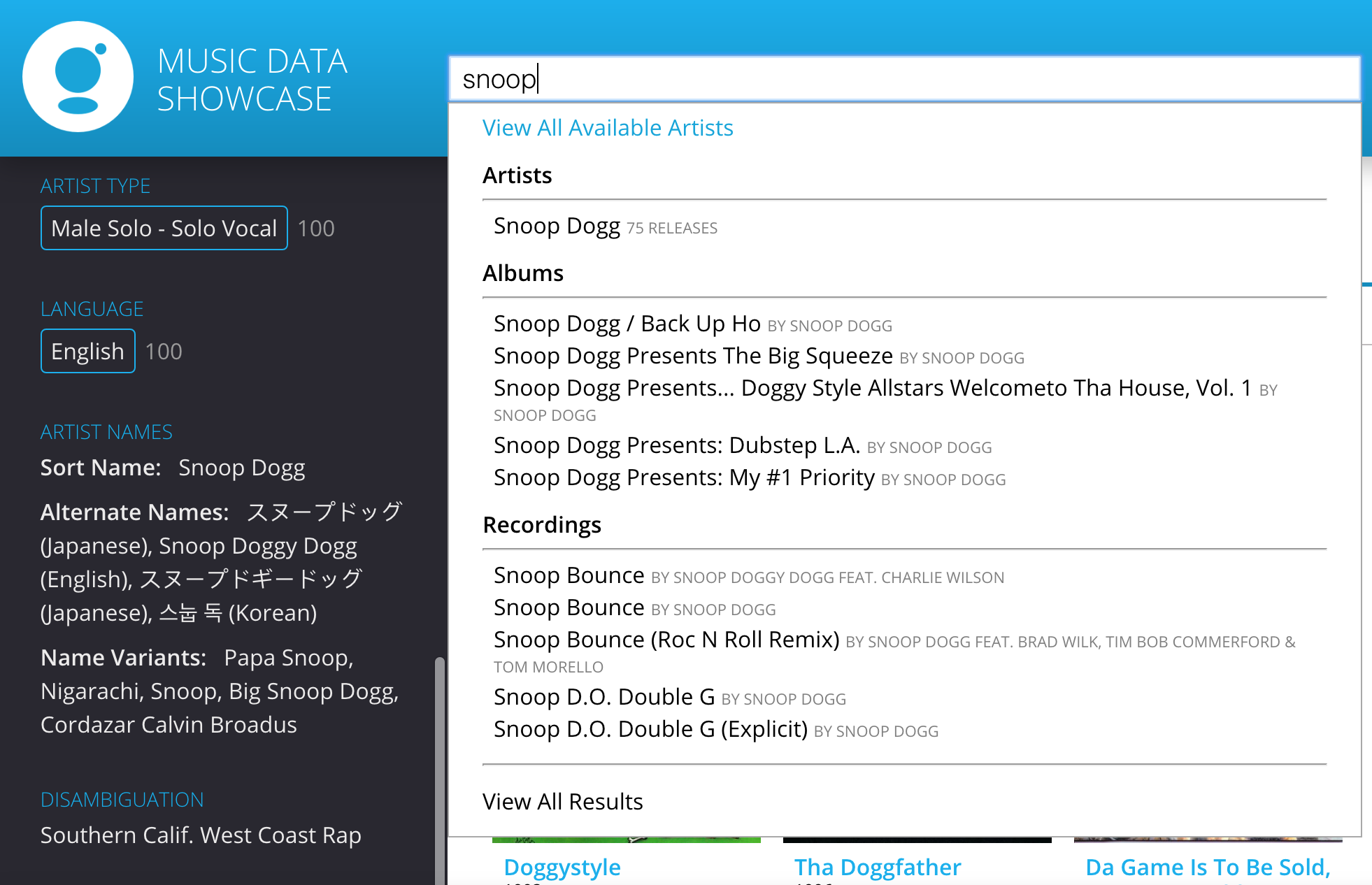
Snoop Dogg is also known as Snoop, Snoop Doggy Dog etc.
| Implementation | Search Package |
|---|---|
| Object Name | artistID, nameVariants |
- Each Alternate Name and Name Variant rolls up to the same Artist ID. Display the artist name as the search result. For example, when users type in "Snoop" (as above), the Artist result shows the ArtistName, and does not show Snoop, Snoop Dogg, Snoop Doggy Dog as separate artists/results.
- After retrieving all the matching artist names from the search phrase, look back to the overarching artistID and display artistName (under artistName array) only.
Popularity Scores
Use Case: Popularity of Artist/Recording Names
This use case shows how to use popularity scores to show results in the order of the most popular for both text and voice searches.
Example
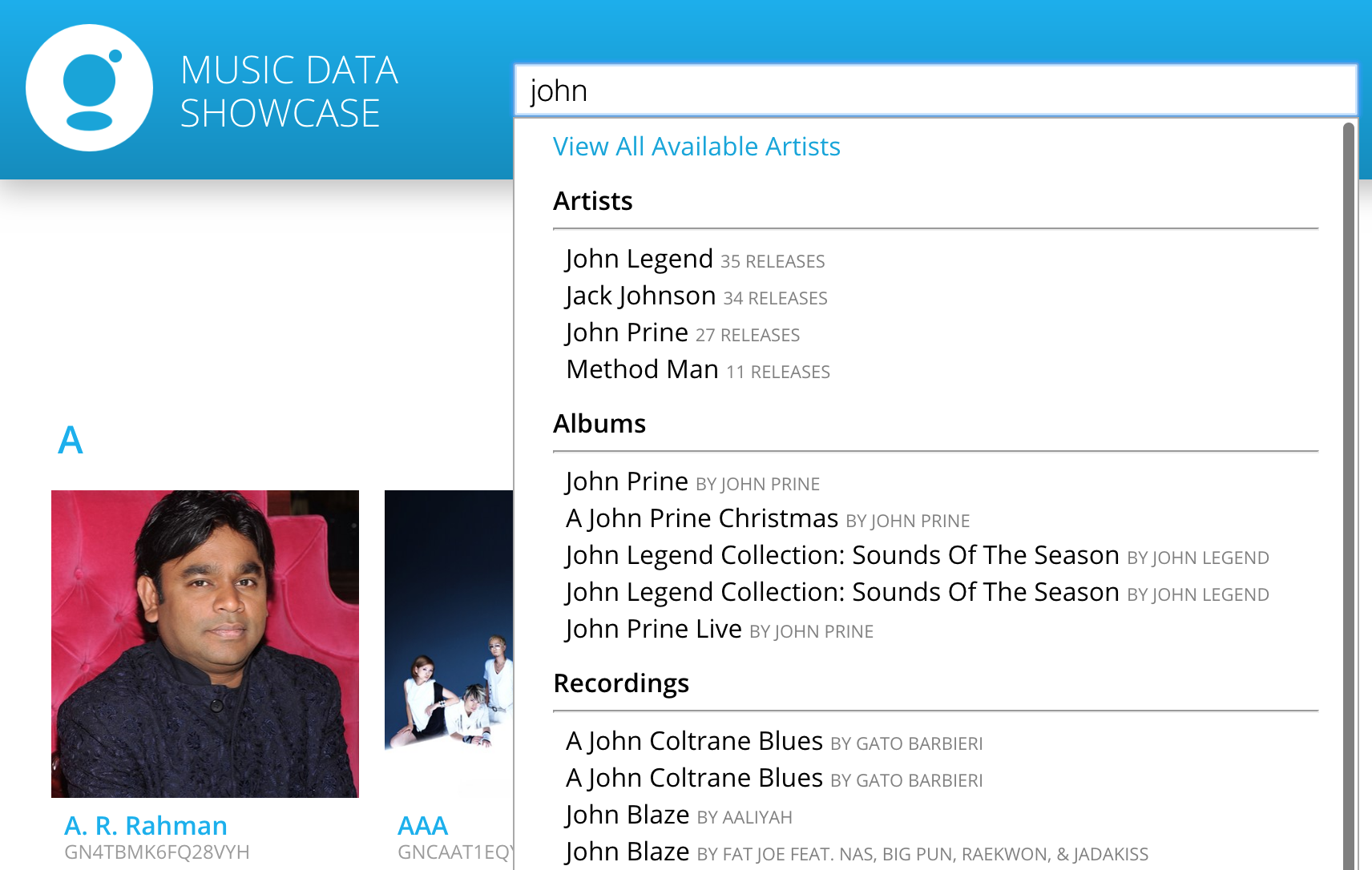
with multiple artists named "John", popularity scores can be used to ensure the return of their search would sort artists and recordings in the order of popularity so end users can more easily locate their desired result.
| Implementation | Engagement Package |
|---|---|
| Object Name | region, score, type (under popularity array) |
After returning the results from the user search for both Artist and Recordings, filter popularity scores based on the user location (region), type of score you are looking for (trending vs historical), and sort results in order of score (under popularity array).
Playlisting
This section describes how to generate use playlist based on Descriptors and Popularity Scores
Correlate Tables
Use Case: Genre and Correlates
Power discovery of similar music genres from one genre listing.
Example
Based on the correlation score from the correlates tables of each genre, a similar music can be identified by finding recordings from genres which have a high correlation score from the genre of the key recording.
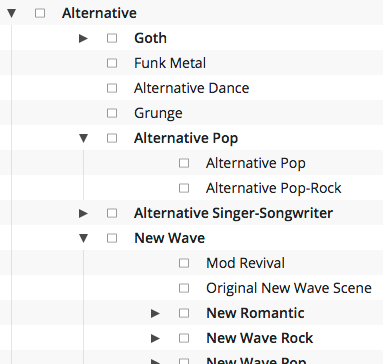
| Implementation | Advanced Discovery Package |
|---|---|
| Object Name | (under era, artistTypes, genres, origins, moods*, array) |
| File Name | Artist and Recording |
*moods only available at recording level
- Join (1) ID (under descriptors > genres, origins, eras, artistTypes, moods* array) from the Artist or Recording file with mappedDescriptorIDs in the Hierarchy file and (2) mappedDescriptorIDs from the Hierarchy file with (under era, artistTypes, genres, origins, moods*, array) in the Correlates file.
- Based on the weight (under descriptors > genres, origins, eras, artistTypes, moods* array) in the Artist or Recording file and correlates score of each descriptor ID in the Correlates file, you will have a list of descriptors that can be ranked by similarity based on the correlation score.
- To compile a list of similar Artists, you can choose to search for artists that have a similar composition of genres, origins, eras, artistTypes.
- To compile a list of similar Recordings, you can choose to search for recordings from other genres, origins, eras, artistTypes, moods that have a high correlation score.
Popularity Scores
Use Case: Sort Playlist by Popularity
After generating playlists based on seed recording and artists, sort the playlist in order of popularity so users can listen to the most popular songs from the playlist first.
Example
generating a playlist with genre = K-Pop dance will return recordings across different eras, artists, moods etc. Leveraging popularity scores allow end users to hear the most popular songs from the group first allowing them to have a better music discovery experience.
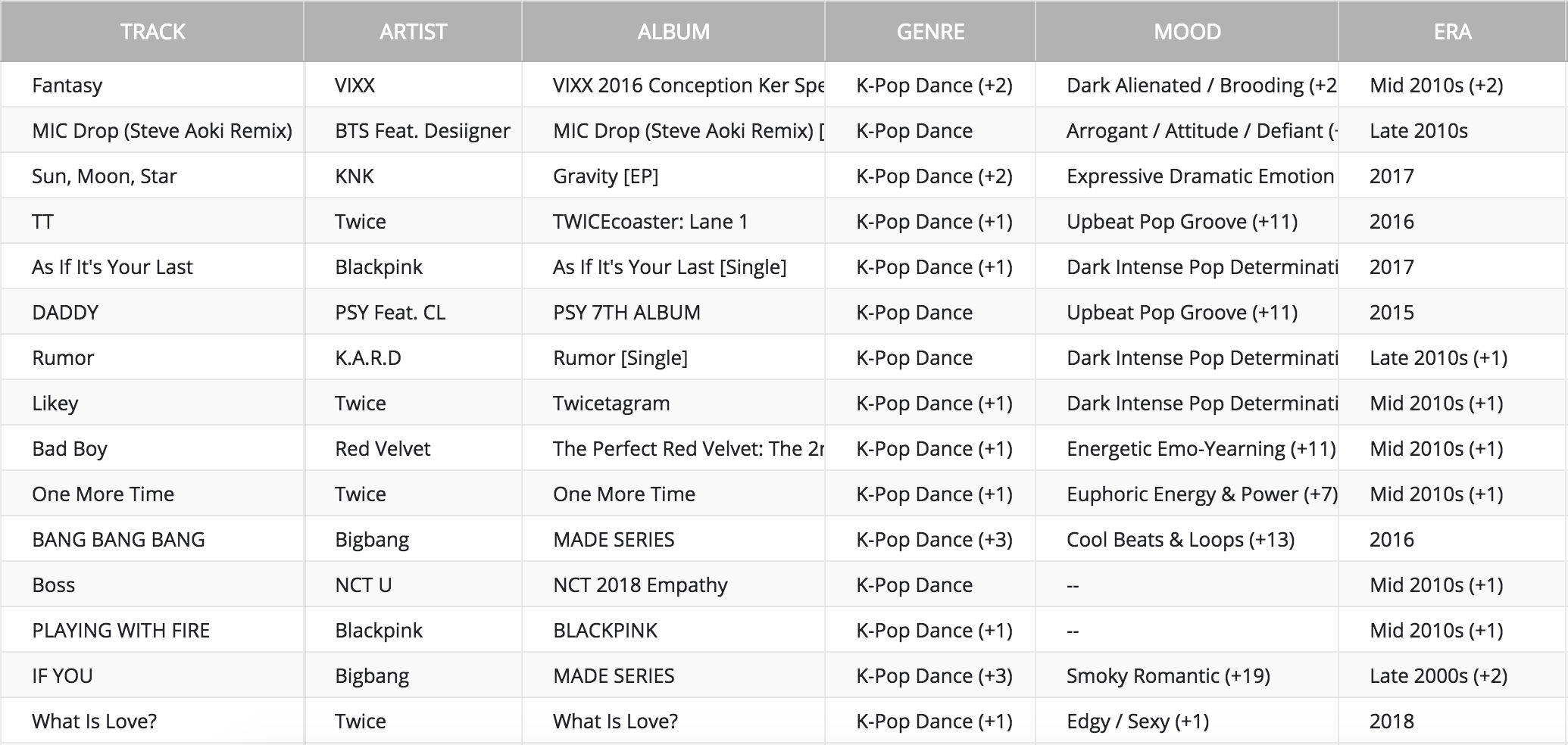
| Implementation | Engagement Package |
|---|---|
| Object Name | region, score, type (under popularity array) |
- After returning the results for playlist generation, filter popularity scores based on the user location (region), type of score you are looking for (trending vs historical).
- Sort results in order of score (under popularity array).
Cross-Media Referencing
Gracenote Celebrity IDs (TMS IDs)
| Name | Description | Example |
|---|---|---|
| TMS ID | Gracenote celebrity identifier for cross-media referencing | artistIDs: 483617 |
Use Case: TMS IDs
Enable pivoting to an artist's filmography, TV appearances, and/or music videos
Example
- Bruno Mars' TV appearances
| Implementation | Engagement Package and GVD Licensing |
|---|---|
| Name | artistID |
- For each artistID, if source (under externalIDs > artistIDs array) equals "tms-music-party-id", cross-media referencing with Gracenote Global Video Database (GVD) is possible.
- Join value (under externalIDs > artistIDs array) from the Artist file with GVD TMS ID to connect to the target artist's filmography, TV appearances, and/or music videos.